
Running a chatbot locally on an iPhone means the AI model lives entirely on your device’s hardware (the processor and RAM) rather than a cloud server. This ensures total privacy and works without an internet connection.
In 2026, the barrier to entry has dropped significantly thanks to powerful mobile chips and optimized apps. Here is the best way to get started.
1. Check Your Hardware
Running LLMs (Large Language Models) is resource-intensive. For a smooth experience, you generally need:
- Minimum: iPhone 12 or newer (4GB RAM). You’ll be limited to very small models (around 1B parameters).
- Recommended: iPhone 15 Pro or newer (8GB RAM). This allows you to run highly capable models like Llama 3.2 (3B) or Gemma 3 at high speeds.
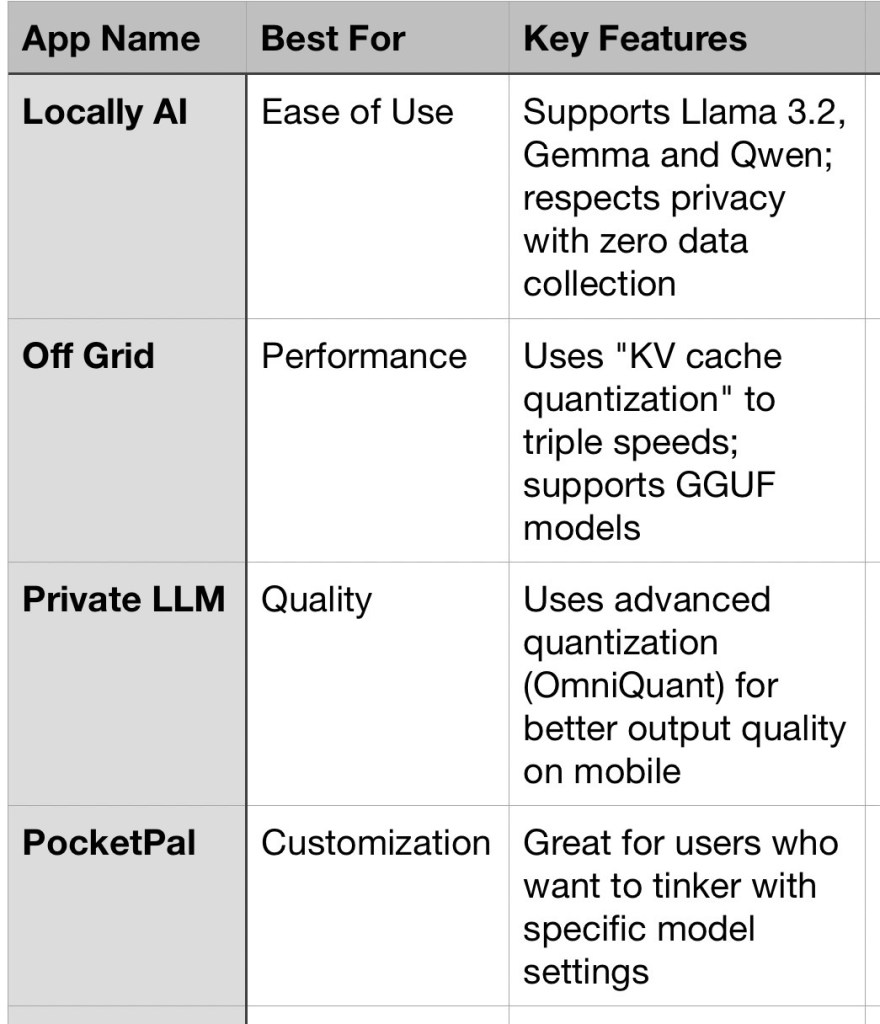
2. Top Apps for Local AI
The easiest way to run a local bot is through specialized apps available on the App Store.
3. Step-by-Step Setup
Most of these apps follow a similar workflow:
- Download the App: Search for “Locally AI” or “Off Grid” in the App Store.
- Select a Model: Inside the app, you will see a library of models.
- Tip: Choose a “3B” model (3 billion parameters) if you have a Pro iPhone. If you have a standard model, look for “1B” or “1.5B” versions.
- Download the Model File: These files are large (typically 1.5GB to 4GB). Connect to Wi-Fi before starting the download.
- Initialize & Chat: Once downloaded, tap the model to load it into your phone’s RAM. You can now turn on Airplane Mode to verify it is running 100% locally.
4. Pro-Tips for Better Performance
- Manage Your RAM: Close other heavy apps (like games or video editors) before starting the chatbot. If the app crashes immediately, the model is likely too large for your phone’s memory.
- Thermal Throttling: Running a local LLM makes your phone hot. If the response speed (tokens per second) drops suddenly, let the phone cool down.
- Battery Drain: Local AI is a “battery hog.” Keep a charger handy if you plan on having long philosophical debates with your offline bot.
Wait, what about Apple Intelligence?
While Apple Intelligence runs some tasks locally, it is a “hybrid” system that often routes complex queries to Private Cloud Compute. Using the apps mentioned above ensures that 100% of the processing stays on your silicon.

