
Extracted from a post from Tidbits (Thanks to Adam Engst)
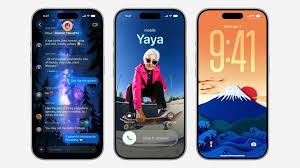
Liquid Glass
- Updated Liquid Glass
- Customize Liquid Glass
- Updated app icons
macOS 27 Golden Gate
- More consistent window positioning persistence across external displays
- Support for Mac mirroring in 5K resolution
- More high-resolution and high-refresh-rate display modes for external displays
- Edge-to-edge sidebars
- Updated menu bar icons
- Consistent corner radii
- Uniform toolbars
- More distinct active windows
- Colorful sidebar icons
- Option-click to secondary sort
- Autosize and reset columns
- Smoother animations in Mission Control and Spaces
- Swipe down to refresh in macOS
- Faster user account creation in macOS
- HDR for macOS system UI
iOS 27
- Extra-large widgets in iOS
- Real-time updates for widgets when app is open
- Independent alarm volume
- Live Activities in Dynamic Island in landscape
- Faster app launches
- Optimized CPU scheduler
- Smoother unlocking on iPhone
- Lock Screen consistently stays awake while scrolling notifications
- Faster Lock Screen switching
- Smoother scrolling in Control Center and Control Gallery
- Smoother scrolling in App Library
- Smoother scrolling in the widget gallery
- Faster and more reliable NFC reading
iPadOS 27
- Optional persistent menu bar on iPad
- iPhone app resizing in iPadOS
- App names in iPad status bar
- Faster browsing and transfers in Files in iPadOS
- Faster window switching in iPadOS
- Faster window closing in iPadOS
- Faster menu bar access in iPadOS
- Undo and redo Home Screen edits in iPadOS
- Extra-large widgets in Today view in iPadOS
- Smoother paging between Home Screen pages
- Expanded touch support in Sidecar
watchOS 27
- Dynamic app grid in watchOS
- Tap gesture on Apple Watch
- Consolidated Find My app in watchOS
- Redesigned settings in the Apple Watch app
- New Smart Stack suggestions in watchOS
- Maps Parked Car widget in Smart Stack
- Transit cards and IDs in Smart Stack in watchOS
- Guest key in watchOS
- View card balance in Wallet in watchOS
- More accurate step tracking on Apple Watch
- Faster media playback in watchOS
- Better battery efficiency on Apple Watch
- Improved battery insights
- Improved Wi-Fi connectivity in watchOS
- More efficient emergency alert monitoring
- Faster app extension launch in watchOS
- More efficient water detection on Apple Watch
tvOS 27
- More responsive Control Center in tvOS
- Smoother animations and app launches in tvOS
- Larger text sizes in tvOS
- AppleCare coverage details in Settings in tvOS
- Faster AirPlay connections to Apple TV and HomePod
- Smart downloads on Apple TV
visionOS 27
- Support for panoramas in visionOS
- Spatial scene support for panoramas in visionOS
- Use your panoramas for Environments in visionOS
- Look and tap to view and respond to notifications in visionOS
- Extra-small widget option in visionOS
- Improved Control Center in visionOS
- Multiple tab views in Safari in visionOS
- Widget for Mac Virtual Display in visionOS
- New windows with curvature in visionOS
- Faster boot and connect to Wi-Fi in visionOS
Camera
- Easier-to-reach Camera experience
- More accurate photo orientation
- All options displayed in Camera settings
- Faster Camera launch in Low Power Mode
- Camera uses less power in Low Power Mode
- Smoother camera switching when zooming in video
Photos
- Add keywords to photos and videos in Photos
- Star ratings in Photos
- Search returns more pleasing photos of people and pets in Photos
- Search for photos and videos using additional metadata
- Customize slideshows in Photos
- Save any slideshow as a video in Photos
- Selection view in Photos
- Album organization improvements in Photos
- Captured by Me collection in Photos
- Identity Documents collection in Photos
- Choose a specific pet in Photo Shuffle
- Option to include photos of yourself in Photo Shuffle
- Save a video frame as a photo
- Faster to start uploading to iCloud Photos
- Option to prioritize syncing to iCloud Photos
- Faster Text Recognition in photos and documents
- Faster loading of new captures in Photos
- Faster rendering of Collections tab in Photos
- Faster to open full-screen view from Photos widget
Shared Albums
- Full-resolution photos and videos in iCloud Shared Albums
- Participate in iCloud Shared Albums from Android and Windows
- Additional participant permissions in Shared Albums
- Easier to invite others in Shared Albums
- Easier to save photos from Shared Albums
- Expire your Shared Albums
- Filter photos and videos in Shared Albums
- Recent activity in Shared Albums
- React with any emoji in Shared Albums
Messages
- Drawing app in Messages
- Improved Messages syncing across devices
- Failed messages automatically retry sending
- Continuous sending of photos, videos, and texts in Messages
- Find offloaded media in Messages
- Thumbnails displayed for offloaded media in Messages
- Search for conversations in Messages by phone number or contact’s nickname
- Consolidated notifications for multiple Tapbacks in Messages
- Faster to add recent camera captures in Messages
- Improved Top Results in Mail
- Faster message loading in Mail
- More reliable search indexing in Mail
- Improved unread badge accuracy in Mail
- Improved list formatting in Mail
Safari
- Faster start page content loading in Safari
- Faster web application performance in Safari
- Faster handling of JavaScript in Safari
- Smoother scrolling in Safari in macOS
- Smoother animations and graphics in Safari
- Smoother start page resizing in Safari
- Enhanced power efficiency for Safari in iOS and macOS
- Web audio no longer interrupts system audio
Apple Music and Music Playback
- New AutoMix transitions
- Refreshed artist pages in Apple Music
- Refreshed album pages in Apple Music
- AirPods Custom EQ
- Faster Apple Music playback start
- Faster Now Playing view loading in Music
- Improved reliability of Apple Music streaming
Maps
- Enhanced Flyover in Maps
- Natural language search for routing in Maps
- Visited Places in Maps available in more markets
- More accurate Visited Places in Maps
- Guides in Maps available in more places
- Offline Maps update improvements
Find My
- Live Activity for Precision Finding with Friends
- More flexible sharing options in Find My
- Find My UI enhancements
Calendar
- Modify multiple Calendar events
- Streamlined Calendar event details
- Stylized notes from third-party Calendar accounts
- Smoother Calendar scrolling
Notes
- Drawing in Notes in macOS
- Copy and paste as Markdown in Notes
- Section links in Notes
- Divider lines in Notes
Reminders
- Grocery List in Reminders language expansion
- Expanded language support for autocategorization in Reminders
Weather
- Updated hourly and 10-day views in Weather
FaceTime, Phone, and Calling
- Dual camera in FaceTime
- Improved FaceTime quality on poor connections
- Switch between two iPhone devices with the same phone number
- FaceTime Live Captions for Traditional Chinese
- Call Recording transcriptions support for Traditional Chinese, Japanese, and Brazilian Portuguese
- Live Voicemail transcription for English (Singapore) and Japanese
Wallet, Apple Pay, and Car Keys
- Easier card selection and payment management with Apple Pay
- Proactive car key setup
- Wallet Order Tracking support in Australia and Canada
AirDrop
- Faster AirDrop transfers
- Faster AirDrop recipient discovery
iCloud and Collaboration
- Access requests for items shared via iCloud
- More easily accessible share link for iCloud collaboration
- Richer iCloud collaboration link previews
- Faster access to shared content on iCloud.com
Home and HomeKit
- View streams from compatible cameras simultaneously in the Home app
- Support for 4K camera recordings in the Home app
- More reliable HomeKit camera storage
- Faster HomeKit accessory pairing
- Faster smart home accessory updates
Networking and Connectivity
- More seamless transitions between Wi-Fi and cellular networks
- Ethernet status in menu bar in macOS
- Improved Bluetooth power management
- Improved connectivity for Thread home accessories
- More power-efficient Personal Hotspot on N1 devices
- Faster network file browsing
- Improved RDMA over Thunderbolt
iPhone Mirroring
- App resizing in iPhone Mirroring
- Control Center access in iPhone Mirroring
- DRM video support in iPhone Mirroring
Apple Account, Recovery, and Security
- Easier to access recovery codes for Apple Accounts
- Quick Start with a recovery contact
- Password help accessible from the Lock Screen
- Faster Rapid Return to Service
CarPlay
- Audio MiniPlayer in CarPlay
- Audio scrubbing in CarPlay Now Playing
- Improved navigation heading and GPS accuracy in CarPlay
- Improved wireless CarPlay reliability
Shortcuts and Automation
- Redesigned Shortcuts editor
- Expanded Get What’s On Screen capabilities in Shortcuts
- Else if support in Shortcuts
- Store data in Shortcuts
- Group conversation support in Shortcuts
- Screenshot and notification automations in Shortcuts
Spotlight
- More relevant Spotlight search suggestions
- Faster shortcuts and actions indexing in Spotlight
Preview and Document Handling
- More document formats in Preview
- Faster PDF saving
Fitness, Fitness+, and Workout
- More accurate route maps in the Fitness app after workouts
- Improved distance accuracy during treadmill workouts
- Faster workout start in the Workout app
- Synced step count in the Health and Fitness apps
- Fitness+ workouts for perimenopause and menopause
- Sort by completed Fitness+ workouts
- GymKit on iPhone and AirPods Pro 3
Health and Sleep
- Perimenopause and menopause symptom logging in the Health app
- Perimenopause and menopause support in the Health app
- Perimenopause and menopause education in the Health app
- Faster data updates in the Health app
- Support for time zone changes in Sleep
Podcasts
- Search within shows in Podcasts
- Updated video podcasts experience in macOS
- Redesigned Podcasts app for tvOS
Apple News and Stocks
- News+ audio support in iPadOS
- Improved performance in Apple News
- Smoother animations in News and Stocks articles
Journal
- More intuitive journaling streaks
- Increased attachment limits in Journal
- Time stamps for Journal entries
- iCloud sync status for Journal entries
Freeform
- Drawing in Freeform in macOS
- Collaborative folders in Freeform
- Smoother Freeform board performance
- More reliable right-to-left text editing in Freeform
- Faster board previews in Freeform
- Dark Mode adaptive canvas in Freeform
Sharing and Media Extensions
- Support for media sharing from third-party apps
- Content-based recipient suggestions for sharing photos and links
Keyboard, Language, and Internationalization
- Faster loading of emoji and sticker keyboards
- New UI language for English (Canada) and English (Philippines)
- Smart language and keyboard configuration suggestions
- Automatic punctuation when typing on multilingual keyboards
- New keyboards for languages including Afrikaans, Basque, Baybayin, English (Philippines), Galician, Guarani, Luxembourgish, Xhosa, and Zulu
- New keyboards for Indigenous languages, including Blackfoot, Comanche, Cree, Kiowa, and Tsuu’tina
- Improved conversion from phonetic scripts like Pinyin and Kana when typing in Simplified Chinese and Japanese
- Multilingual grammar checking
- Scribble support for Hindi and Marathi with Apple Pencil
- QuickPath and typing suggestions for Vietnamese VNI keyboard
- Onscreen context for more relevant typing suggestions for Chinese and Japanese
- New keyboard layout for Slovenian and Estonian
- Natural language time formats for Chinese and Hindi
- Faster multilingual text processing for handwriting in multiple languages
- Punctuation suggestions as you type in Chinese
- Chaizi typing
- Alternate calendars for India support current time zone while traveling
- Holiday-aware alarms in China
Accessibility
- Faster Voice Control response in iOS
- Pairing and handoff improvements for MFi hearing devices
- Easier reading and editing of PDFs using VoiceOver
- Show Borders for macOS accessibility
- Streamlined setup for Touch Accommodations in iOS and iPadOS
- Streamlined Assistive Access setup
- Faster entry and exit from Assistive Access and Guided Access modes
Gaming
- Improved game controller settings
- Improved PlayStation Access controller support
- Improved navigation in Game Overlay
 Dr Bob, Brain Mechanic